Fresh USA Parking Management Software is a Windows-based platform for managing vehicles, parking permissions, entry and exit activity, current vehicle status, parking zones, event history, and reports from one structured database.
The software is designed for parking lots, parking garages, apartment and condominium parking, HOA and gated communities, employee parking, commercial properties, fleet yards, industrial facilities, and other controlled parking areas. It gives parking operators and property managers a practical way to replace separate spreadsheets, isolated gate lists, and manual records with one parking management application.
Lifetime Software License. No Mandatory Monthly Fresh USA Software Fee.
Local Windows operation, shared SQL deployment, and cloud-hosted database/server architectures can be configured according to the project.
Parking Software Download & Technical Details
What Parking Management Software Does
Parking management software gives an operator one place to manage who is allowed to park, which vehicles are registered, where they are allowed to enter, what activity has occurred, and which vehicles are currently shown inside a controlled parking area. Instead of treating the gate, vehicle list, parking records, and reports as separate tasks, the software connects them into one operating workflow.
- Manage vehicles and authorized users in a searchable parking database
- Control parking permissions by user, vehicle, parking zone, schedule, or access point
- Monitor entry and exit activity from connected parking entrances and exits
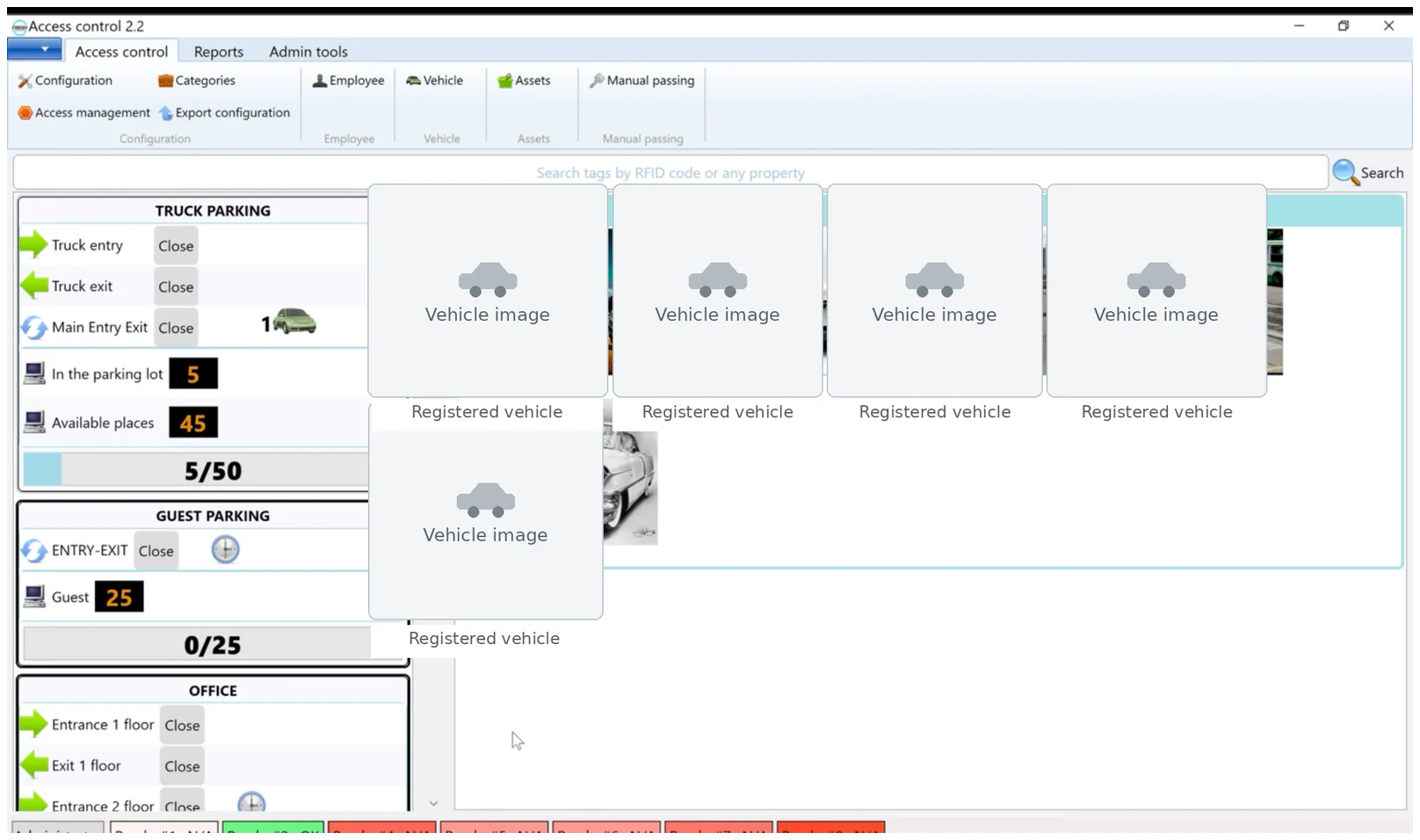
- View current vehicle status and live parking activity in supported configurations
- Search parking history and review events by date, vehicle, user, or identifier
- Create parking reports and export records for administration and review
- Manage multiple entrances, exits, lanes, and parking zones from one database
Parking Management Software for Lots and Garages
Fresh USA Parking Management Software is intended for real parking operations where vehicle records, access permissions, entry and exit history, occupancy, and reporting need to be managed together. It can support a small controlled parking lot with one operator workstation or expand to a larger parking garage, residential property, employee parking facility, or multi-entry site using a shared database.
The software is not limited to opening a gate. It provides the management layer behind the parking operation: the vehicle database, user records, parking rules, current status, event history, reports, and operator tools used to administer the facility.
Live Parking Activity and Current Vehicle Status
In a connected parking configuration, processed entry and exit activity can be used to maintain current-inside status and give operators a live view of registered vehicles currently shown inside the controlled area. For sites with several monitored access points, the dashboard can combine parking activity with reader status and parking-zone information.
This helps operators answer practical questions quickly: Which registered vehicles are currently inside? Which entrance processed the last event? Did a vehicle enter or exit during a specific time period? Which parking zone or rule applies to that vehicle?
Vehicle and User Management
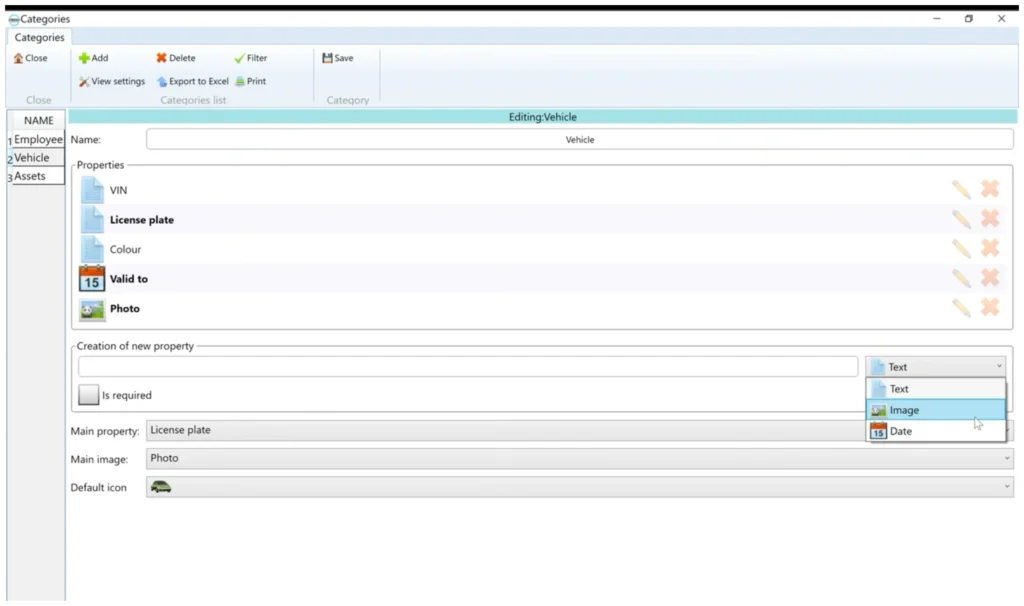
The parking database can store vehicle and authorized-user information in searchable records. Depending on the project, records can include the vehicle, license plate, driver or resident, employee or tenant information, vehicle category, assigned parking area, credential or identifier, authorization status, and other required fields.
Authorized operators can add, edit, deactivate, block, restore, search, and review records according to the configured workflow. This centralizes parking administration and makes routine changes easier than maintaining separate spreadsheets, gate-controller lists, or handwritten records.
Parking Permissions, Zones, and Access Rules
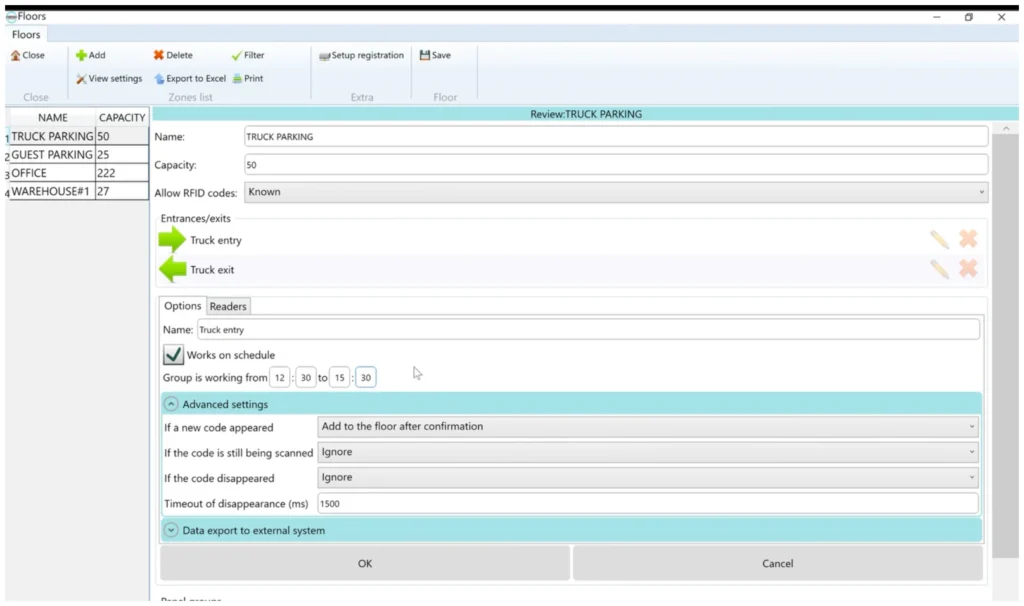
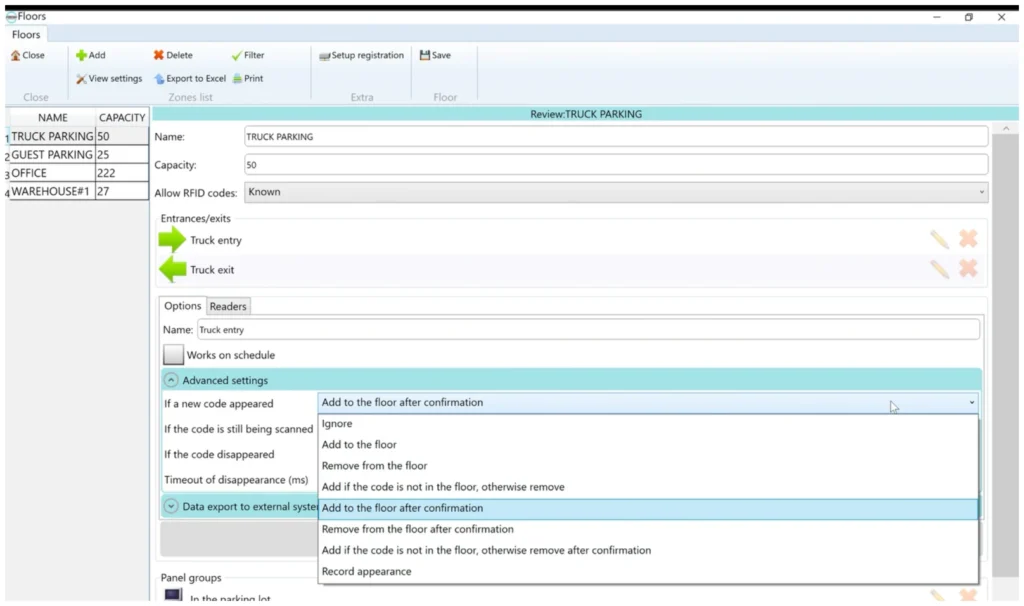
Parking areas can be organized into zones with different access points, capacities, schedules, and permissions. Rules can be configured for residents, employees, tenants, guests, contractors, service vehicles, fleet vehicles, or other authorized groups according to the project requirements.
For facilities with multiple entrances or internal checkpoints, the software can process events from several monitored locations while keeping the vehicle and permission records in one management database. This makes it possible to match the software workflow to the actual property instead of forcing every site into the same parking process.
Entry and Exit History, Search, and Parking Reports
Fresh USA Parking Management Software records parking activity in searchable history. Operators can review recent entry and exit events, search stored vehicle information, filter records by date, and export selected data to Excel for administration and reporting.
These records can support daily parking operations, access verification, incident review, internal reporting, and accountability. Historical parking data remains available for later review instead of being limited to the current gate status.
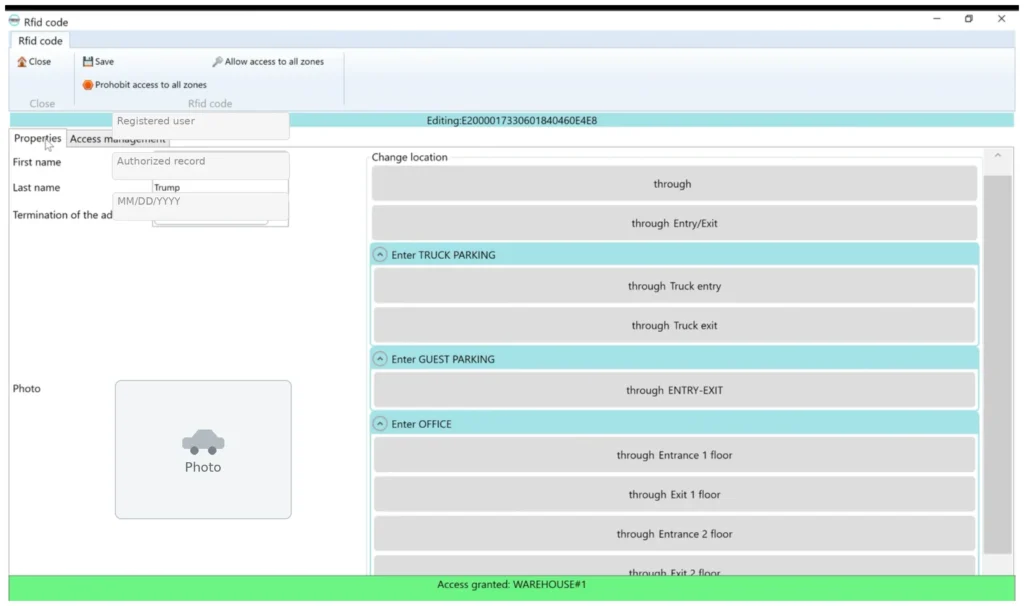
Parking Management Software Core Features
- Vehicle and authorized-user registration
- Searchable parking database
- Live entry, exit, and current-inside status in supported configurations
- Parking zones and controlled access points
- User, vehicle, schedule, and permission management
- Automatic event processing with manual operator control when required
- Searchable event history with date-based filtering
- Parking reports and Excel export
- Multiple entrance, exit, lane, and checkpoint support
- Multiple Windows operator workstations with a shared database when configured
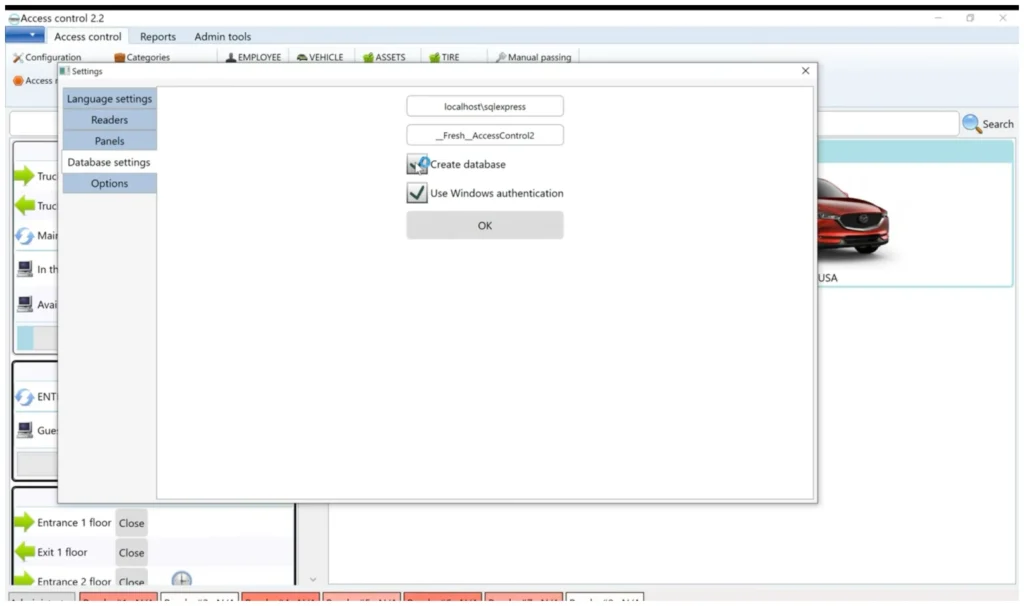
- Local SQL, shared SQL, or cloud-hosted database/server architecture
- Project-specific integration with compatible external software and databases
Parking Software Deployment Options
Fresh USA supports several deployment architectures so the parking management software can match the size and operating model of the facility.
1. Local Windows Parking Management
A smaller parking operation can use a Windows workstation with a local SQL database for vehicle registration, parking permissions, event history, reports, and administration.
2. Shared SQL Parking Management
For larger facilities, multiple Windows workstations can use a common SQL database. Operators work with the same vehicle records, permissions, entry and exit history, and reporting data from the configured computers.
3. Cloud-Hosted Database or Server Architecture
Where remote infrastructure is required, the application can be configured to connect to a cloud-hosted server or database environment when network, VPN, firewall, security, latency, and database requirements are properly planned. This is a connected deployment architecture for the Windows application rather than a generic browser-only parking SaaS product.
Parking Management Software for Existing Gates and Access Equipment
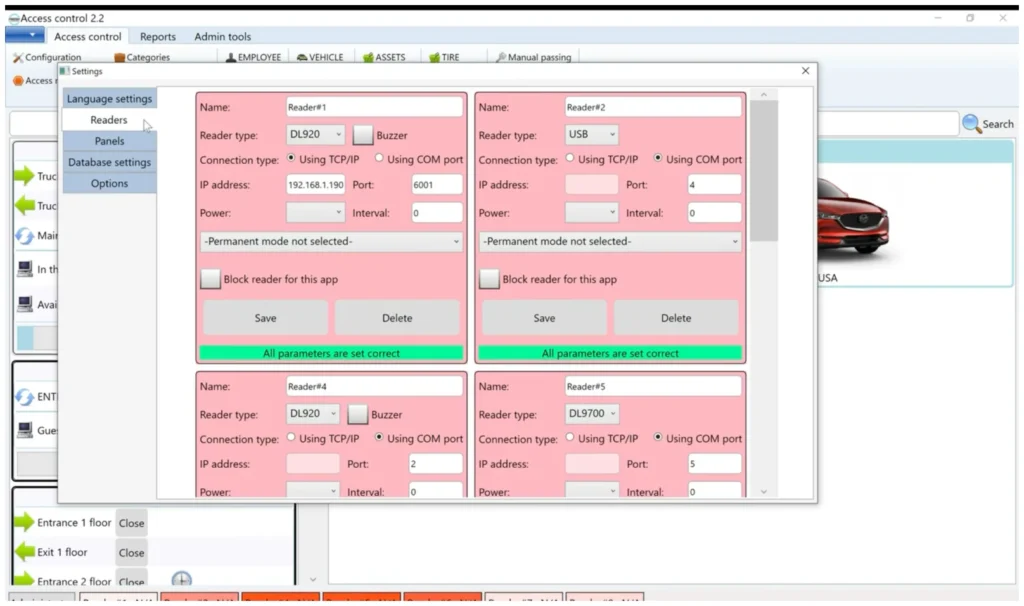
Many parking projects already have gates, barrier arms, readers, controllers, or other access equipment. Fresh USA can review the existing hardware, communication interfaces, gate logic, required identification method, network availability, and desired parking workflow to determine whether compatible equipment can be retained and integrated.
Depending on the hardware, communication can include TCP/IP Ethernet, RS232/COM, USB, and selected wireless connections. Automatic vehicle identification can use compatible long-range credentials, license plate recognition, or other supported identification methods. The parking software remains the management layer for records, permissions, events, current status, and reporting.
How Parking Management Software Works
- Vehicles, users, and parking permissions are registered in the parking database.
- A connected entrance, exit, or checkpoint receives an identification event.
- The configured parking record and permission are checked.
- The event is processed according to the applicable rules and the connected access point can perform the assigned action.
- Entry, exit, or zone activity is recorded in the parking history.
- Current vehicle status can be updated in supported configurations.
- Operators can search records, review activity, update permissions, and export reports.
Watch Parking Management Software Video
Parking Management Software vs. Parking Management System
Parking management software is the application used to manage vehicle records, parking permissions, current status, entry and exit history, parking zones, reports, database operation, and supported integrations.
A parking management system is the complete physical solution and can also include gates, barrier arms, vehicle readers, LPR cameras, intercoms, controllers, payment equipment, and other lane hardware.
This page is focused specifically on parking management software. For a complete parking solution, see the Parking Management System page. For paid parking with ticketing, fee calculation, payment processing, and gate-controlled exit, see Parking Payment Systems.
Parking Software Integration
Fresh USA can configure project-specific integrations between the parking management software and compatible ERP systems, property-management platforms, access-control databases, business databases, or other external software environments.
Depending on the available interface, integration can include data import, synchronization, scheduled data exchange, selected event exchange, or other approved workflows. Integration scope is reviewed individually because APIs, database structures, authentication methods, file formats, and synchronization rules vary between systems.
Available architecture:
Local Windows Management • Shared SQL Database • Cloud-Hosted Database/Server • Compatible External System Integration
Who Uses Parking Management Software?
- Parking lots and parking garages managing authorized vehicles, access activity, and reports
- Apartment and condominium properties managing resident and tenant parking
- HOA and gated communities managing recurring vehicle access and parking permissions
- Employee parking facilities managing staff vehicles, schedules, and controlled entrances
- Commercial buildings and offices managing employee, tenant, contractor, and visitor parking
- Industrial and warehouse facilities managing authorized vehicles and controlled vehicle entrances
- Fleet yards and service facilities maintaining vehicle records and controlled access activity
- Hotels and private parking operations requiring structured vehicle records and parking control
What to Confirm Before Choosing Parking Management Software
A useful parking software proposal depends on the actual site and operating workflow. Before choosing a configuration, confirm:
- Number of vehicle entrances, exits, lanes, and internal checkpoints
- Parking zones and approximate capacity
- Types of users and vehicles that require authorization
- Required vehicle identification method
- Existing gates, barriers, controllers, readers, or LPR equipment
- Number of operator workstations
- Local network and Internet availability
- Local SQL, shared SQL, or cloud-hosted database preference
- Required parking reports and record-retention workflow
- ERP, property-management, or external database integration requirements
Configure Your Parking Access System
Why Choose Fresh USA Parking Management Software?
- Lifetime software license without a mandatory monthly Fresh USA software subscription
- Windows-based parking management for organizations that want a dedicated operational application
- Local, shared, or hosted database architectures selected according to the project
- Live operational visibility for current vehicle status and parking activity in supported configurations
- Expandable parking management for additional entrances, exits, parking zones, readers, and operator workstations
- Searchable parking history and reports for administration and review
- Hardware and software integration for projects that combine parking management software with physical access equipment
- Project-specific integration with compatible databases and external business systems
Frequently Asked Questions About Parking Management Software
What is parking management software?
Parking management software is an application used to manage vehicle records, parking permissions, entry and exit activity, parking zones, current vehicle status, event history, and reports from one structured parking database.
What is the difference between parking management software and a parking management system?
Parking management software is the application and database used to manage parking records and operations. A parking management system is the broader physical solution that can also include gates, barriers, readers, cameras, intercoms, payment equipment, and other parking hardware.
Can the software show which vehicles are currently inside?
Yes. In a connected configuration, processed entry and exit events can maintain current-inside status and provide operators with live visibility into registered vehicles currently shown inside the controlled parking area.
Can multiple computers use the same parking database?
Yes. A shared SQL configuration can support multiple Windows operator workstations using common vehicle records, parking permissions, history, and reporting data.
Can the parking management software support multiple entrances and exits?
Yes. Multiple controlled entrances, exits, lanes, checkpoints, and parking zones can be configured according to the selected hardware and project workflow.
Can the software work with existing parking gates or barriers?
Potentially. Fresh USA can review the existing gate equipment, controllers, communication interfaces, and desired workflow to determine whether the existing hardware is compatible or which components should be upgraded.
Can Fresh USA integrate parking software with another business system?
Yes, when the external system provides a compatible interface. Integration requirements are reviewed per project because APIs, databases, authentication, data fields, and synchronization rules differ between systems.
Does Fresh USA require a monthly software subscription?
No. Fresh USA provides a lifetime software license without a mandatory monthly Fresh USA software subscription. Hosting, payment processing, third-party services, or custom support may have separate costs where applicable.
Where can I download the parking software?
Software downloads, Windows requirements, database setup, installation information, and technical documentation are available on the Fresh USA Parking Software Download & Technical Details page. That page is intentionally focused on the software download and technical installation intent.
Request a Parking Management Software Quote
If you are evaluating parking management software for a parking lot, garage, apartment property, HOA, employee parking facility, commercial site, fleet yard, or industrial property, Fresh USA can review the required entrances, exits, parking zones, users, operator workstations, database architecture, and integration requirements and recommend a suitable configuration.
For an accurate recommendation, provide the site layout, number of entrances and exits, approximate number of vehicles, existing gates or equipment, required identification method, network availability, database preference, delivery location, and any external software integration requirements.